FitSize
Fit automatically the size of the document or artboards based on chosen layers. Add padding if you need extra space. Disable expansion and contraction at certain sides and save presets.
- Plugin tech.:
- UXP
- PS support:
- PS 2021+ (Win10 & Mac)
- CPU support:
- All (ARM, M1, Intel)
Features descriptions
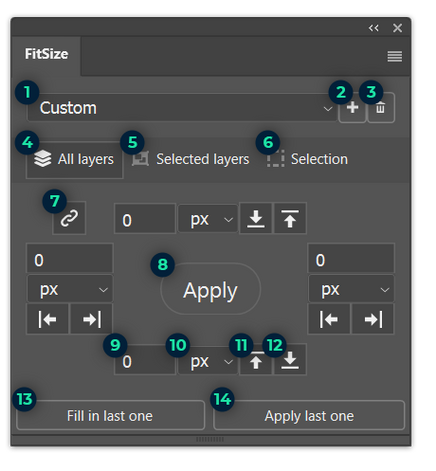
- Presets list - allows you to change preset.
- Save current values into new preset.
- Remove selected preset.
- Use all layers within document/artboard(s) to calculate boundaries.
- Use only selected layers within document/artboard(s) to calculate boundaries.
- Use pixels selection to calculate boundaries.
- Link or unlink sides.
- Resize document/artboard(s) using current values.
- Set positive or negative padding.
- Use px, in, cm, mm, pt or pc units.
- Allow the edge to move inside.
- Allow the edge to move outside.
- Fetch values saved in the active document or artboards.
- Apply saved values directly.
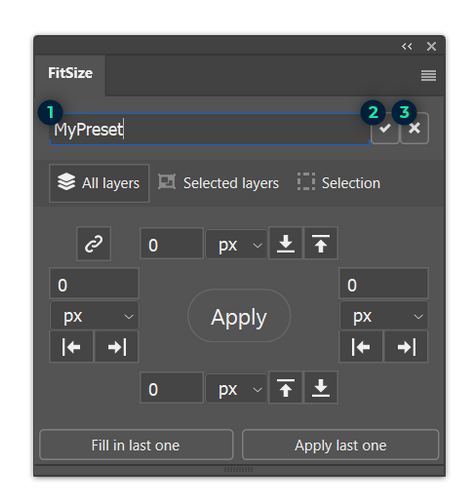
Add new preset
- Input to type the new preset name.
- Confirm new preset name and save.
- Cancel and do not save preset.